Camera-based form coach · iPhone, iPad & Apple Watch

Train with a coach that watches your form.

FormFit AI uses your camera to count your reps, score every movement and show you exactly what to fix, with a tap on your wrist for every rep and an AI coach that writes your feedback on your own device. Your video is never stored or uploaded.

10 exercisesOn-device pose trackingApple WatchiPadOn-device AI coachiCloud syncApple HealthWidgets
FormFit AI home screen with today's calories, last workout and a slide-to-start control
How it works

From floor to feedback in seconds.

01 — SET UP

Prop it up. Press go.

Pick an exercise, slide to start, and lean your phone against anything. When your whole body is in view, FormFit AI starts the countdown by itself, so there's no walking back to the screen.

  • Squat, push-up, lunge, plank, jumping jack, bicep curl, shoulder press, high knees, mountain climber and burpee
  • A 3D demo plays first, so you know the move before you do it
  • Pose tracking runs on your phone, with no signal needed
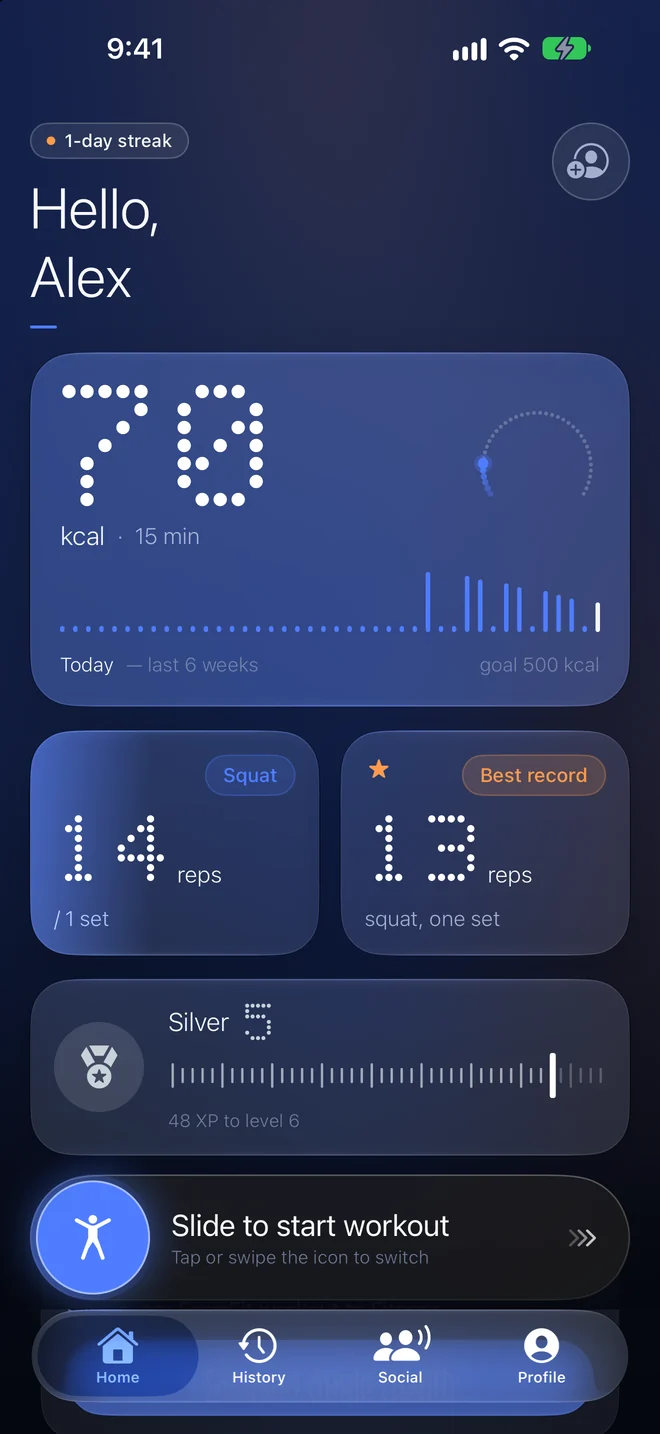
Home screen of FormFit AI with today's calories, last workout and a slide-to-start control
02 — TRAIN

Every rep, counted and scored.

Reps are only counted when the movement is clean, and every set gets a form score. After the session you get the numbers, and on supported devices a short personal note from the AI form coach on what to tighten up.

  • Clean reps versus total reps
  • A form score per set, with tips when depth or alignment slips
  • An AI coach that spots fatigue, rushed reps and shallow depth, written on your device
  • Workouts are saved to Apple Health if you allow it
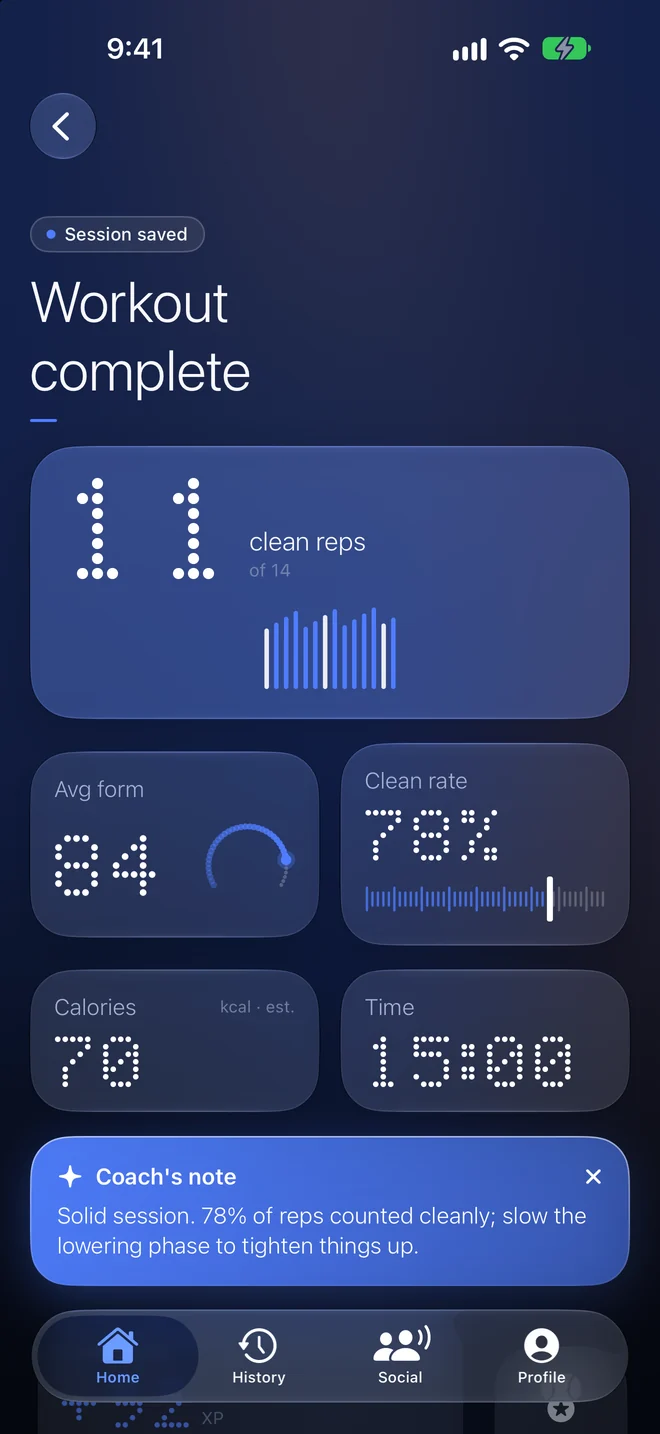
Workout summary showing clean reps, average form score and a coach's note
03 — SEE IT

A body model that's yours.

Your 3D figure is shaped by your weight and the measurements you log. Or let the camera do it: two photos give you estimated measurements to start from. They're estimates, not clinical measurements, and you can adjust them.

  • Rotate it, scrub through time, and watch it change
  • Photos are analysed on your phone and never uploaded
  • Optional. Measurement tracking is off until you turn it on
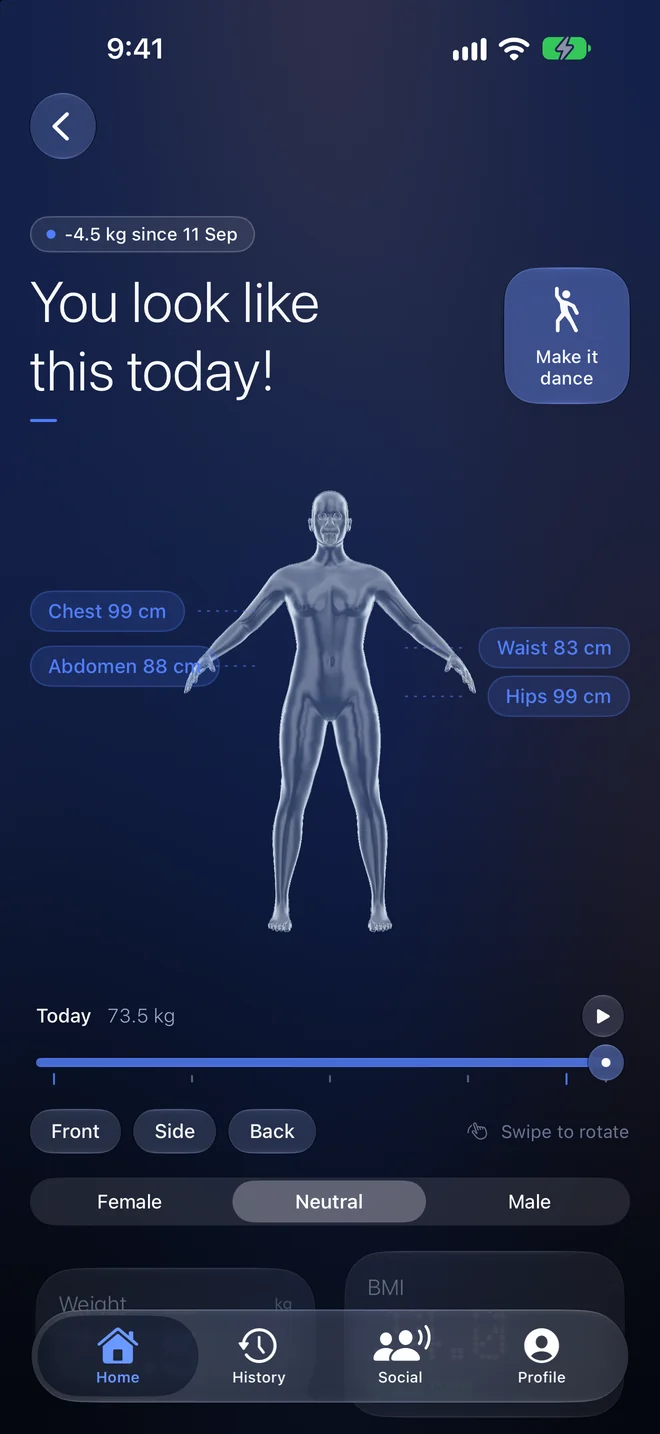
The 3D body model showing chest, waist, abdomen and hip measurements
04 — TRACK

Progress you can read.

Calories, form and reps over time, your streak, and personal records, laid out so you can see at a glance whether you're moving the right way.

  • Streaks, levels and badges that reward showing up
  • Friends, cheers and challenges, only if you choose to join
  • Widgets for your home and lock screen
  • Your progress follows you to your other devices
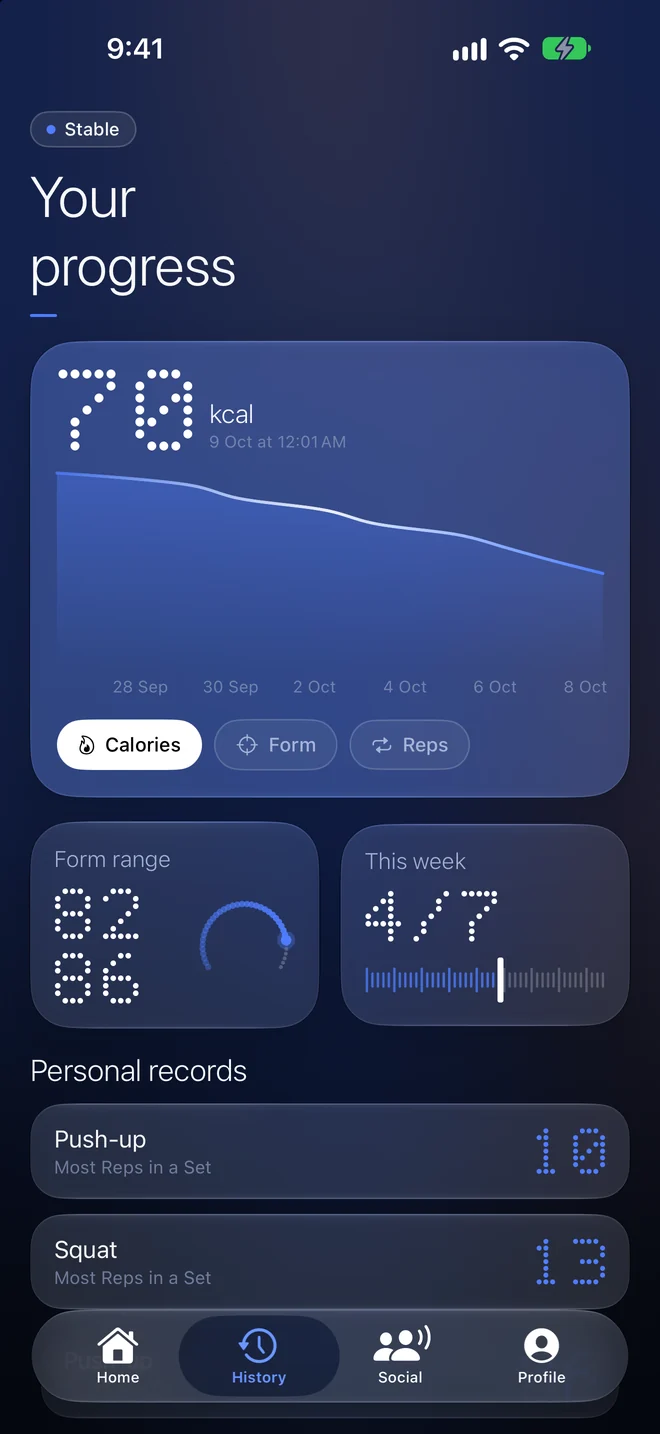
Progress screen with a calorie chart, form range and personal records
05 — GO FURTHER

Free to start. Pro when you want more.

The core is free: three exercises, a week of history, two themes and iCloud sync between your Apple devices. Pro opens all ten exercises, your own custom moves, full history, Google cloud backup that also reaches Android, every theme, five app icons and extra launch animations.

  • Yearly, monthly or a one-time lifetime purchase
  • Priced by the App Store in your currency, shown before you confirm
  • Cancel any time in your Apple ID settings
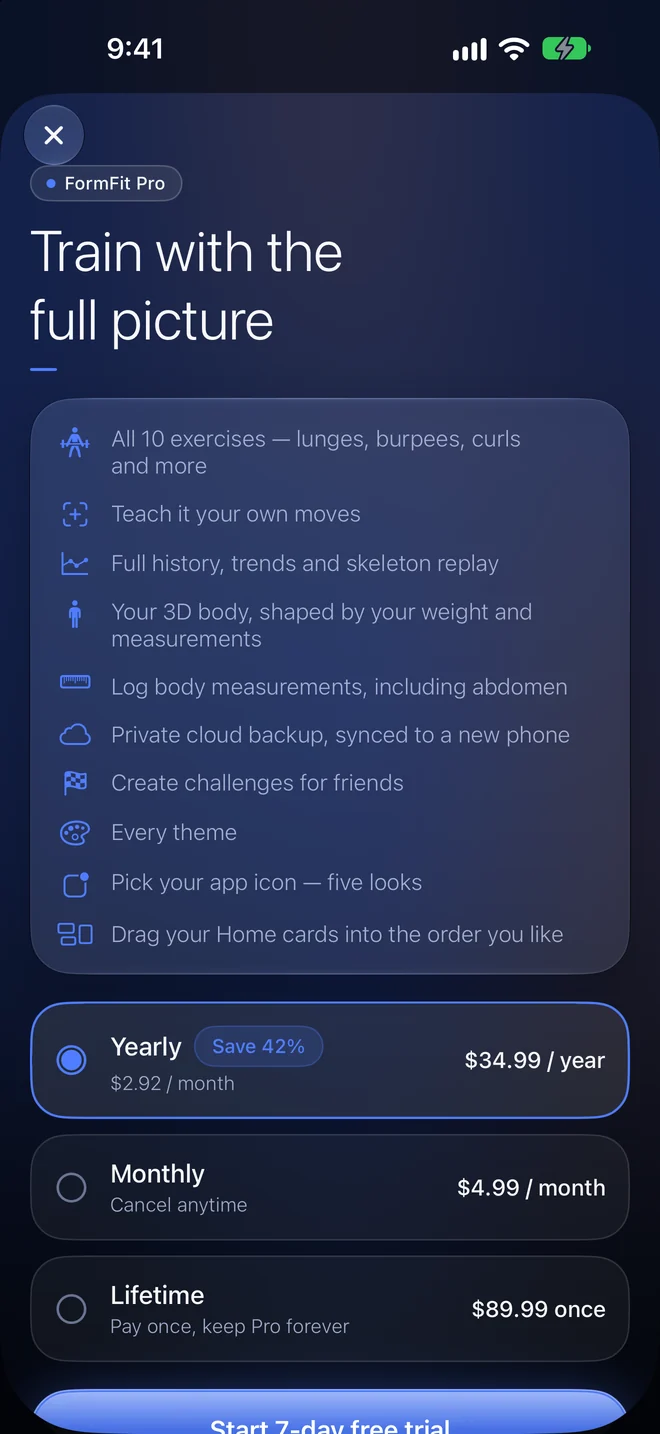
FormFit Pro screen listing everything included
Built for real routines

Everything around the workout, handled.

Widgets

Your day, on your home screen.

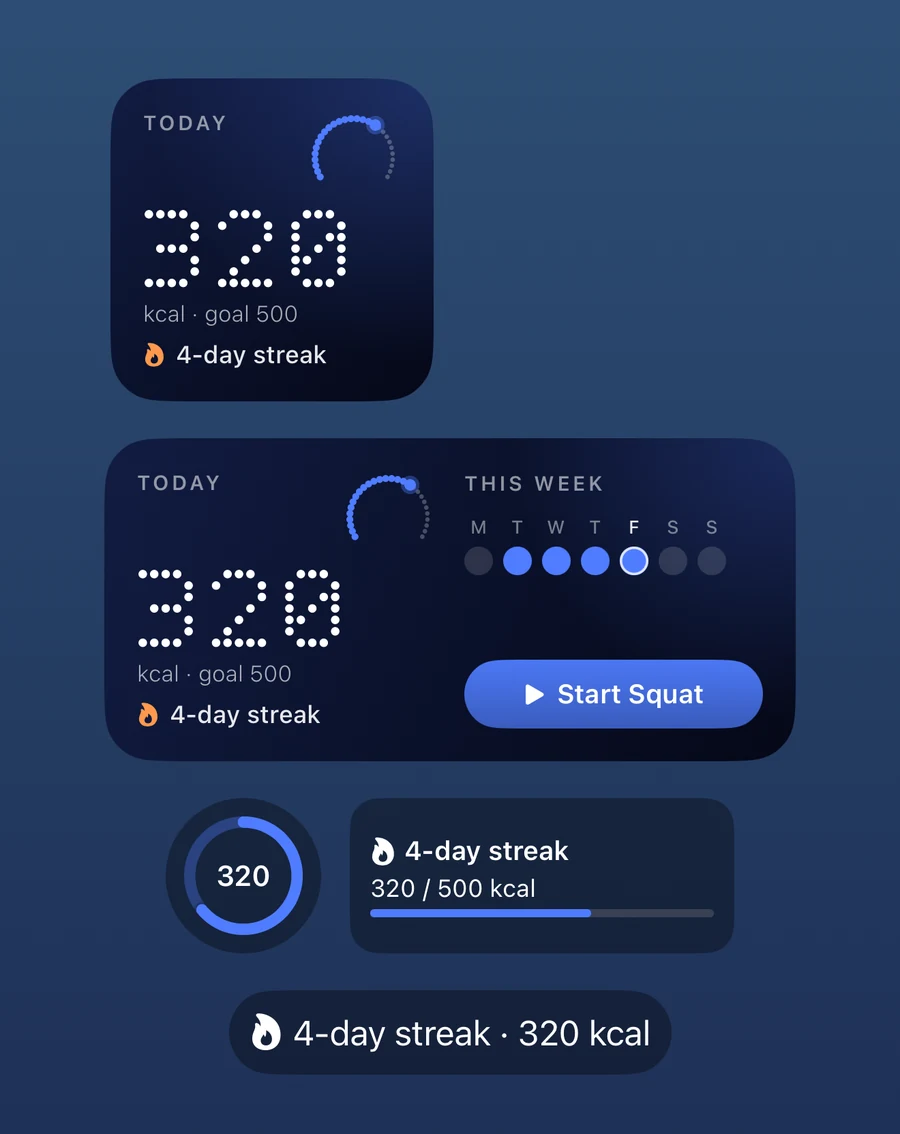
A small ring for today's calories, a medium one with your week and a one-tap start button, and compact lock-screen widgets for a quick glance.

FormFit AI widgets: today's calorie ring, a medium widget with the week and a Start Squat button, and lock screen widgets
Reminders

Nudges, not nagging.

Opt-in workout reminders on the days you pick, a streak saver, and a Sunday recap. Skipped automatically when you've already trained.

Social

Train together.

Cheer friends, join challenges and see the leaderboard. Only totals are shared, and only while you choose to be visible.

Apple Watch

A tap on your wrist for every rep.

The watch app taps you for every clean rep and buzzes harder when your form slips, so you can keep your eyes off the screen. It shows reps, form score, live heart rate and calories, lets you skip rest or end the workout from your wrist, and keeps today's ring and streak a glance away. The camera workout still runs on your iPhone or iPad.

Sync

Pick up on any device.

iCloud keeps your workouts, weight, measurements and profile in step across your iPhone and iPad for free, with nothing for us to see. With Pro, a private Google cloud backup also carries your progress to Android and to a new phone.

AI form coach

Feedback in your words.

After each workout, a short note on what went well and the one thing to fix. It's written by Apple Intelligence on your own device, so nothing is uploaded. Available on iPhones that support Apple Intelligence.

iPad & big screens

Made for the big screen.

Use an iPad as your stand-up screen. Layouts spread across the width on iPad, a Mac, or a foldable iPhone, with the same camera tracking.

Make it yours

Five app icons and a set of themes.

Midnight is free. Pro adds Aurora, Onyx, Lagoon and Slate, plus every colour theme.

Midnight app iconAurora app iconOnyx app iconLagoon app iconSlate app icon
Privacy

Your camera, your business.

We built this so we don't need to know much about you.

Video stays on your phone.

Pose tracking and the AI coach run on-device. Video and scan photos are never stored or uploaded, and nothing is sent to an AI service. Only skeleton points for the replay stay on your phone.

No ads. No tracking.

No advertising, no analytics SDKs, no cross-app tracking. This website sets no cookies at all.

Delete it any time.

Settings ▸ Delete account & all data removes your account and everything we hold. You can also export your data first. How deletion works.

Free and Pro

Start free. Upgrade if it earns it.

Free compared with Pro
What you getFreePro
ExercisesSquat, push-up, plankAll 10, plus your own custom moves
HistoryLast 7 daysEverything
3D body and measurementsPreviewFull tracking over time
Backup & synciCloud between your Apple devicesPlus private Google cloud backup, new-phone restore and Android
Themes & app icons2 themes, Midnight icon, Assemble launch animationAll themes, 5 icons, all launch animations, custom home layout
Rep counting, form score, AI coach*, Apple Watch app, iPad, widgets, remindersIncludedIncluded
YearlyMonthlyLifetime, pay once

*The AI coach needs a device that supports Apple Intelligence. Prices are set by the App Store, shown in your currency before you confirm, and may vary by country. Subscriptions renew automatically until you cancel at least 24 hours before the period ends, in Settings ▸ Apple ID ▸ Subscriptions. There are no other fees. App screenshots on this page show test pricing; the App Store price is what counts. See the refund policy.

Questions

The honest answers.

Is my video recorded or uploaded?

No. The camera feed is analysed on your phone to find your joints, then discarded. We never receive video or photos. For the replay, only skeleton points are kept on your phone.

Where and when can I get it?

FormFit AI is built for iPhone, iPad and Apple Watch and is heading to the App Store. It isn't live yet; the button above lets you email us to be told at launch. An Android version is on its way.

Does it work on iPad and Apple Watch?

Yes. On iPad it uses the whole screen and the same camera tracking, so you can prop it up and train. The Apple Watch app is a companion: your iPhone or iPad does the camera tracking while your watch taps you on every rep, shows live heart rate and lets you skip rest or end the workout. The watch doesn't track form by itself because it has no camera.

What is the AI form coach, and does my data leave my device?

After a workout it turns your numbers (reps, form scores, pace) into a short note about what to fix. It runs on your own device using Apple Intelligence, so nothing is sent to us or to an AI service. It only appears on iPhones that support Apple Intelligence, and it's feedback, not medical or professional coaching.

How does syncing work across my devices?

iCloud sync is on by default and keeps your workouts, weight, measurements, custom exercises and profile in step across your Apple devices, using your own iCloud storage. You can turn it off in Settings. Pro adds a private Google cloud backup, which is also how progress reaches Android. Pose data and video are never synced.

How accurate are the rep counts and form scores?

Good lighting, your whole body in frame and the phone propped steady matter most. Form scores are guidance based on joint angles, not a coach's judgement, and rep counts can miss in poor conditions. It's a training aid, not a medical device.

Are the body measurements real?

They're estimates. Scans work out your shape from two photos, which loose clothing or phone tilt can throw off by several percent. Use them to track change over time, and measure by tape if you need precision.

Do I need an account?

No. You can use the app without one. An account (Sign in with Apple, Google or email) is only for cloud backup, the leaderboard and friends. iCloud sync doesn't need one.

What does it cost?

The core app is free. Pro is optional: yearly, monthly or lifetime, charged through your Apple ID at the price the App Store shows you.

How do I delete my data?

In the app: Profile ▸ Settings ▸ Delete account & all data. Or email us and we'll do it. Details here.

Is it safe to exercise this way?

FormFit AI doesn't know your health. Check with a doctor if you're unsure about exercise, clear space around you, and stop if something hurts. See the terms.

FormFit AI app icon

Your next set, watched.

Coming soon to the App Store. Email us and we'll send you one message when it's live. Nothing else.